Output Rack
Out of the rack and into a pedal · A TL072 on seventeen strips · 6 HP · By Onion Madder · Mess O' Pedals
A rack signal is big: about ±5 V, ten volts from top to bottom. A guitar is a few hundred millivolts, and a pedal or an amp built for one does not want ten volts. Neither does the line input on a recorder or a mixer. This module is the step down: one 3.5 mm jack in from the rack, a volume knob, and a 3.5 mm jack out at a level a pedal, an amp or a line input will take. A 3.5 mm to 1/4″ cable takes it into a pedal or an amp. Mono, one knob, 6 HP.
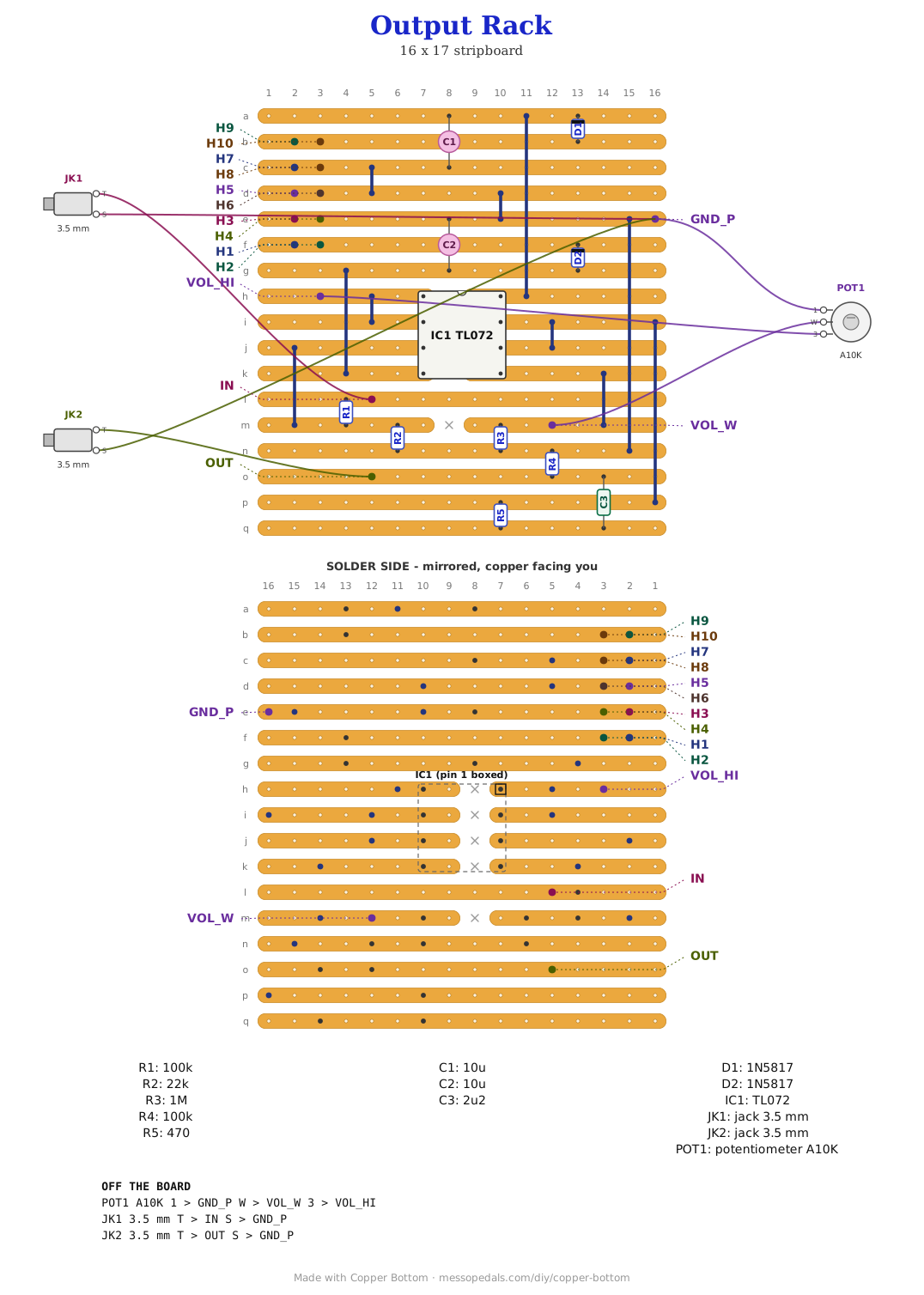
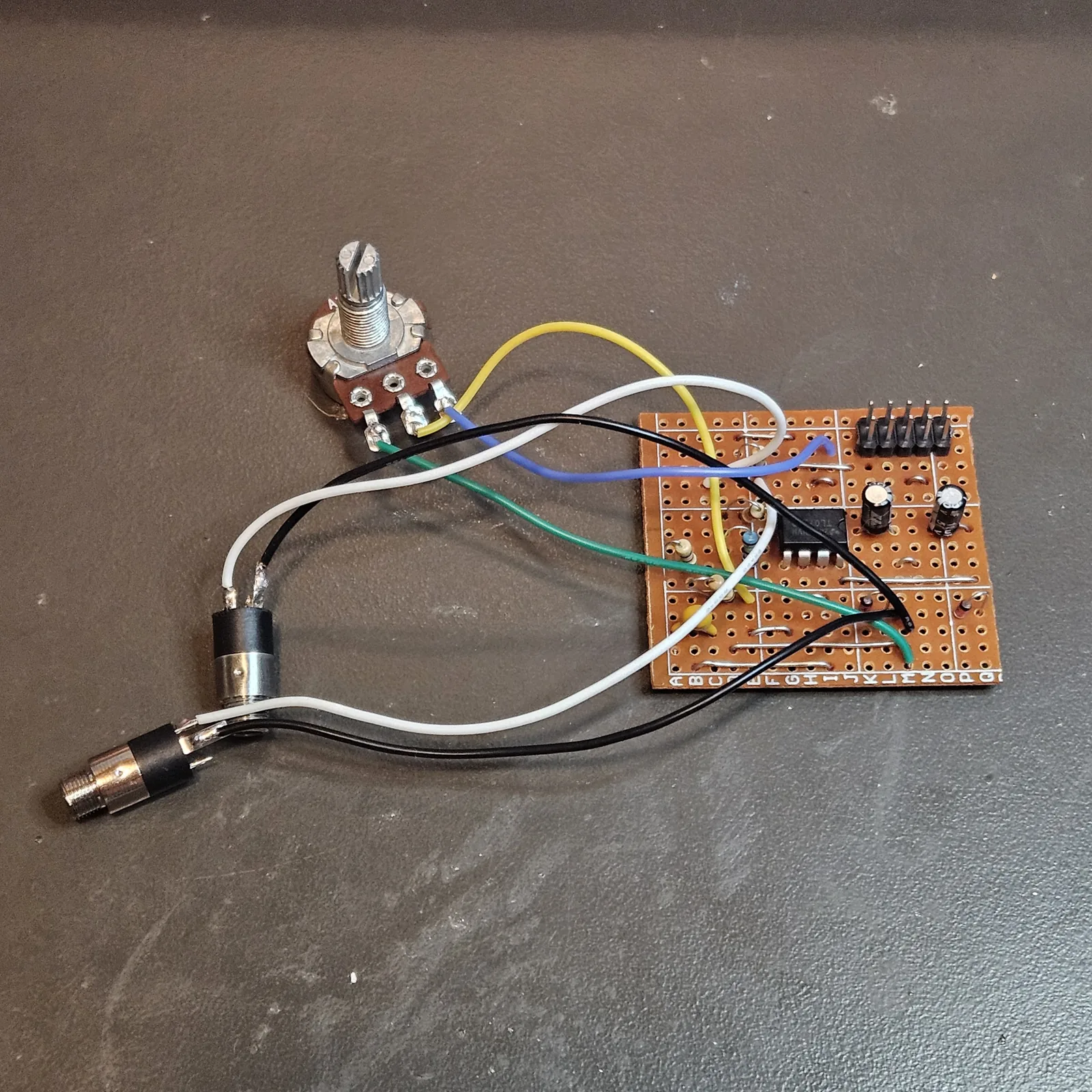
What you'll need
tap to expand / collapse
On the board, counted from the layout file:
- 1× TL072 dual op-amp, 8-pin DIP - spot it: TL072 printed on top, notch marks pin 1. An NE5532 or TL082 sits in the same holes (IC1)
- 2× 100k (brown-black-yellow; R1, R4)
- 1× 1M (brown-black-green; R3)
- 1× 22k (red-red-orange; R2)
- 1× 470 (yellow-violet-brown; R5)
- 1× 2u2 ceramic MLCC (225; C3)
- 2× 10u electrolytic (C1 to C2) - spot it: the stripe marks the negative leg
- 2× 1N5817 Schottky, the reverse-polarity diode - spot it: a fat black body, band toward the cathode (D1 to D2)
- 10 wire links (J1 to J10) - solid core, tinned
- 1× 2×5 pin header, plain, 0.1″ - the Eurorack power connector. spot it: ten square pins in two rows. Not the shrouded kind; a shroud is 20 mm long and would cover the neighboring strips
- Stripboard, 17 strips × 16 holes or larger
Off the board
- 1× A10K 9 mm Alpha pot, the VOLUME knob, wired as a divider: lug 3 to VOL_HI, wiper to VOL_W, lug 1 to GND_P. spot it: A on the body means log, which is what makes it feel like a volume knob
- 1× Thonkiconn PJ398SM 3.5 mm jack, the rack input: tip to IN, sleeve to GND_P
- 1× Thonkiconn PJ398SM 3.5 mm jack, the output: tip to OUT, sleeve to GND_P. A 3.5 mm to 1/4″ cable takes it to a pedal or an amp
- 1× 6 HP Eurorack blank panel, one knob, and a Eurorack power cable
What it is
The input goes through a 100K and a 22K to ground, which divides it by about 5.5. A full rack signal comes out of that at about 1.8 V peak to peak, around 0.64 V rms: a hot guitar, or the top of a home-studio line input. The divider is also the input impedance, about 122K, which is close to the 100K every rack input looks like.
Op-amp A follows the divider and drives the volume pot, an A10K, from its lug 3. Driving the pot from an op-amp rather than straight off the divider keeps its log taper the shape it is meant to be. Op-amp B follows the wiper, with a 1M to ground so its input is never left floating while the pot is off the board or a wiper scratches. Both stages are followers, so what comes out is the right way up.
Out of B: a 470R so a long cable cannot make the TL072 ring, then a 2.2 µF ceramic to block DC, then the jack, with a 100K to ground on the jack side. Pedals hate DC, and a rack signal can carry some, so the cap is not optional. The 100K keeps the cap sitting discharged, so plugging a cable in does not pop. Into a 10K line input, 2.2 µF is -3 dB at about 7 Hz; into a pedal it is nothing.
Not for headphones as drawn. 2.2 µF into 32-ohm headphones cuts everything below about 2 kHz, and a TL072 is not meant to drive them anyway. A headphone out is a different output stage, not a bigger cap.
The layout file is the guide
As on every stripboard guide here, the build document is the file itself: ↓ Download Output_Rack.json - import it into Copper Bottom and the editor gives you the board picture, the placement walkthrough, the electrical checks and a printable build sheet, all from the same file. No coordinates are written out on this page on purpose: the editor is the viewer, and a number typed twice is a number that can drift.
The netlist
Quoted verbatim from the layout file. It was written from the board, so checking the board against it can only pass - what it is for is carrying the circuit somewhere else, and telling you what each strip is supposed to be doing while you stare at it. The bug board's nets keep the names they have on its own page.
The off-board wiring
15 pads leave the board. Ten of them are the power header.
| Pad | Goes to |
|---|---|
| IN | The input jack, tip. The rack signal, into the 100K |
| VOL_HI, VOL_W | The VOLUME pot. Lug 3 to VOL_HI, the divided signal out of op-amp A; the wiper to VOL_W, into op-amp B; lug 1 to GND_P |
| OUT | The output jack, tip. DC-blocked, at most about 1.8 V peak to peak with the knob all the way up |
| GND_P | Ground for the panel: the pot's lug 1 and both jack sleeves. One pad, one wire, daisy-chain the rest |
| H1 … H10 | The power header, 2×5, pins down the strips. H1 and H2 are -12 V and take the cable's red stripe; H3 to H8 are ground; H9 and H10 are +12 V |
The panel
6 HP, which is 30.5 mm of a 128.5 mm blank - Amplified Parts sells reversible black-and-aluminum blanks in every width from 2 to 20 HP. The template is drawn for 9 mm Alpha pots (7 mm holes), Thonkiconn jacks (6 mm), sub-mini toggles (6.5 mm) and 5 mm LEDs, with the rack's rails kept clear top and bottom and the four M3 mounting holes where Doepfer puts them. I/O along the bottom, controls above, as everything on this site does it.
↓ output-rack-panel.pdf
Nobody has drilled this one yet - the holes are the module's pads, where they sit is the format applied to them.
The rack block, the same on every module
The top of the board is the same idea as every module on this shelf. The 2×5 header takes the rack's power cable, mounted with its pins running down the strips so each pair of pins lands on one strip: -12 V, then three grounds, then +12 V. That is the only way it can go on stripboard - turned the other way, the -12 and ground pins would share copper. The red stripe on the cable goes to H1 and H2. A 1N5817 stands in series with each rail so a cable put on backwards does nothing instead of everything, and a 10 µF sits on each rail. No regulator: there is no CMOS here, and a TL072 is happy on the rails as they come.
The IDC socket on the power cable overhangs the header by about two strips at each end. Nothing tall stands there - the generator that drew this refuses to put anything standing under the socket - so keep it that way if you move a part.
Check the cuts under the chip before the first power-up, with a meter. A DIP on stripboard puts pin 1 and pin 8 on one strip, pin 2 and pin 7 on the next, and so on down - each pair held apart by nothing but the chip's own cut. Here that puts pin 4 and pin 5 on the same strip, -12 V a whisker of copper from the volume wiper, and pin 1 a whisker from +12. A cut that did not quite go through puts a rail straight onto the pot. Cut them, then measure each one.
How it works, in one breath
Two resistors make the signal smaller, an op-amp makes it strong again without making it bigger, a pot picks how much of it you want, a second op-amp makes that strong again, and a cap throws away anything that is not sound. That is the whole module. It is the least interesting board on this shelf to look at and the one every other module needs before you can hear it through a pedal.
Things to try
- Hotter. 47K for R2 lets it reach about 3.2 V peak to peak, enough for a studio line input at +4 dBu. Too hot for most pedals with the knob all the way up
- A 1/4″ jack instead. A panel-mount 1/4″ mono jack on the same OUT pad is the same circuit and goes straight into a pedal without an adapter cable. It wants a bigger hole, about 9.5 mm for a 3/8″ bushing. Untested: mine has a 3.5 mm jack
- Stereo. Build two. They are small, and the second one's input jack is the right channel
- Back through the rack. Out of here, through a pedal, and into the Ladybug Rack is a pedal that drives an envelope
The circuit is the attenuator and buffer that sits at the end of most DIY Eurorack output modules. The layout is Onion Madder's, drawn in Copper Bottom.